

TermioX
TermioX
Secure SSH terminal & SFTP/FTP client for remote server and file management.

Desktop‑grade SSH terminal emulator
Specialized helper keyboard row
Multi‑protocol connectivity (SSH/Telnet/Mosh)

Key Features of TermioX
Transform your experience with TermioX's main features.
Desktop‑grade SSH terminal emulator
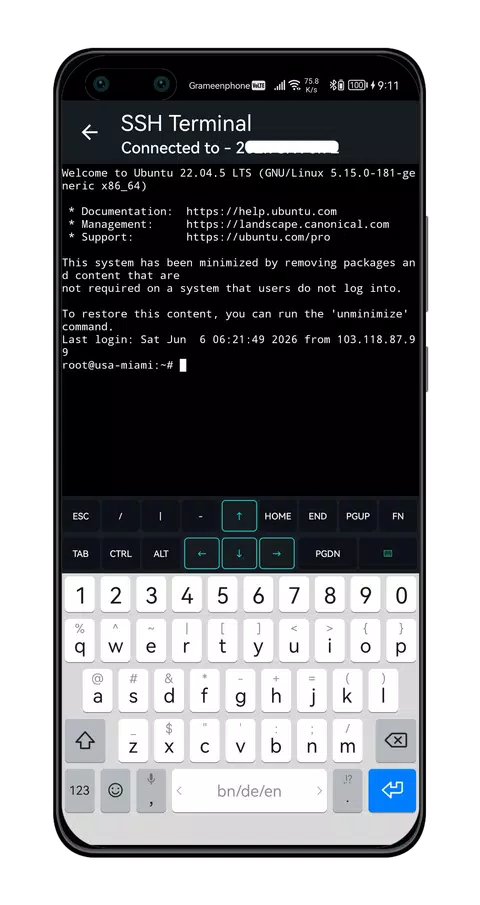
Run commands on Linux servers, cloud VPS, Raspberry Pi, and any SSH host with full ANSI color support, smooth scrolling, and pinch‑to‑zoom font resizing.
Explore features and benefits.
Experience innovation at hand.
Download and start using.
Specialized helper keyboard row
Includes a 17‑key helper row for faster command entry (Ctrl, Alt, Tab, Esc, arrows, pipe, slash, and more), optimized for mobile terminal work.
Improved performance and stability.
Regular software updates.
Enhanced user experience.
Why choose TermioX
Streamline your life with TermioX today!

Multi‑protocol connectivity (SSH/Telnet/Mosh)
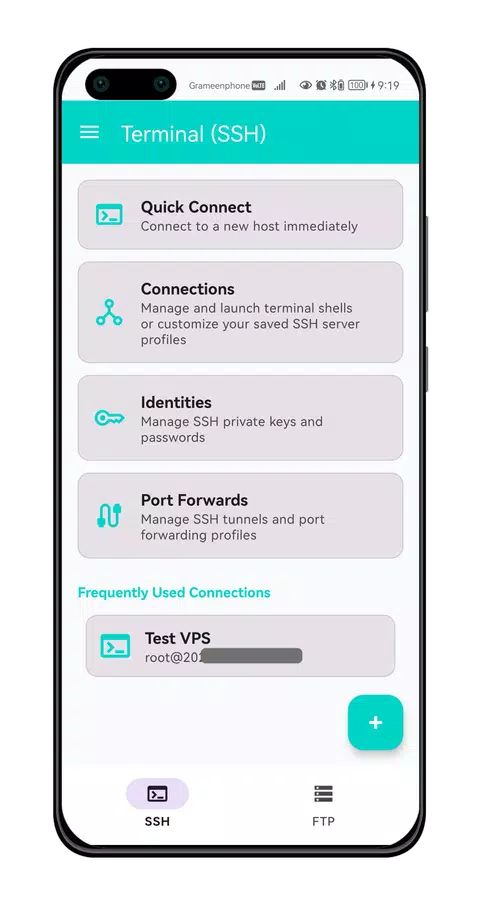
Connect using SSH for secure administration, Telnet when needed, and Mosh for low‑latency sessions on unreliable networks.

Port forwarding & SSH tunnelling
Supports Local, Remote, and SOCKS forwarding to securely access internal services and create encrypted tunnels from your Android device.

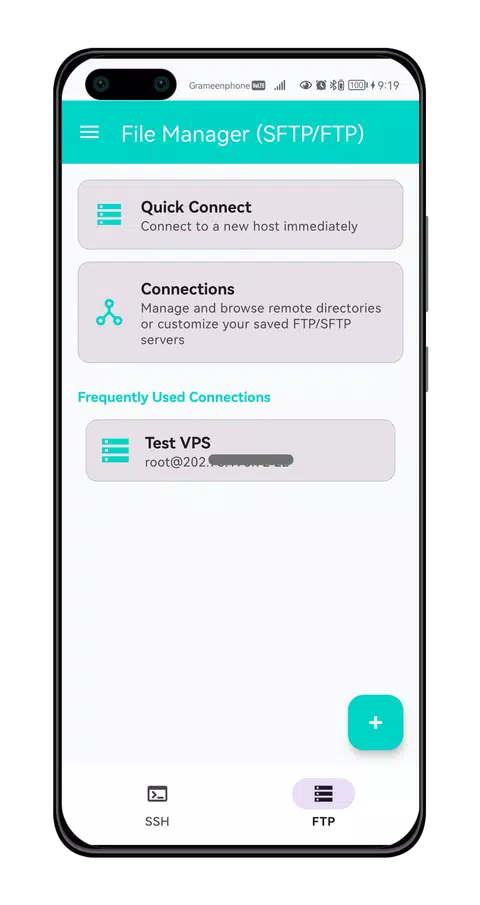
SFTP/FTP/FTPS file manager
Browse local and remote files in a clean dual‑pane interface with support for SFTP, FTP, and FTPS (explicit TLS).


Reviews about TermioX
Discover our users' feelings and comments.
I've been using TermioX for a while, and it’s amazing! The design is intuitive, and the features work seamlessly.

User 1
Jul 28, 2026
I can't get enough of TermioX! It’s fun and engaging. It’s worth every download!
User 2
Jul 17, 2026
TermioX has greatly enhanced my experience. The performance is top-notch. Five stars from me!
User 3
Jul 3, 2026
More Apps like TermioX
Discover your next favorite app today!
Proxy Pass: Fast & Secure VPN
Proxy Pass VPN - Secure proxy for fast browsing. Stay safe on public Wi-Fi.

QR Access - QR Code Tool
All-in-one QR app with QR Code Scanner & Generator
Proxy Master VPN
VPN Proxy Master

Compass Pro: Digital Navigator
Accurate & smart digital compass to find directions for hiking and travel.

Doc Scanner
Document Scanner

Calc Pro: Calculator & Locker
Calculator Pro: All-in-One Calculator, Secure File Locker & Private Vault

Video Downloader
All in One Video Downloader

Proxy Booster
Proxy Booster VPN
Compass
Simple Compass Android App

Downloader Pro
Video Downloader Pro
Compass Lite
Simple Compass Lite App

mPlayer
Islamic Music Player

Flashlight
Simple, Easy & Free Flash Light

FB Downloader
Facebook Video Downloader

Call Recorder
Call Recorder allows you to record your all phone calls.
FAQs about TermioX
Browse the most frequently asked questions that you may interested in.
What is TermioX: SSH & SFTP Client?
TermioX is an Android app for remote server management and secure file transfers. It provides a desktop‑grade SSH terminal emulator plus SFTP/FTP/FTPS file management so you can run commands on remote machines and move files securely.
Which protocols and connection types does TermioX support?
It supports SSH for remote shell access, SFTP for secure file transfers, and also FTP and FTPS (explicit TLS). For connectivity, it also supports Telnet and Mosh, plus SSH tunnelling/port forwarding (Local, Remote, and SOCKS).
Can I use TermioX to manage Linux servers, cloud VPS, or Raspberry Pi?
Yes. TermioX is designed to execute commands on Linux systems and any SSH server, including cloud VPS instances and devices like Raspberry Pi.
What file operations can I do with the built-in SFTP/FTP file manager?
You can browse local and remote files, upload/download, delete, rename, create folders, and change permissions (Chmod). It also includes a built‑in code editor for editing text/code files directly on the server and a transfer queue showing progress, speed, and status.
What security features does TermioX provide for credentials and access?
TermioX supports App Lock using a 4‑digit PIN or biometric fingerprint (Android BiometricPrompt), encrypted local storage using Android Keystore for passwords/private keys, an Identity Manager for storing SSH keys (PEM, PPK) and credentials, and host key verification to help prevent man‑in‑the‑middle attacks.
Does TermioX support SSH keys and agent forwarding?
Yes. It includes an Identity Manager to store and reuse SSH private keys (including PEM and PPK formats) and supports SSH Agent Forwarding for chaining connections securely.
Does TermioX include port forwarding / SSH tunnelling?
Yes. It supports SSH tunnelling with Local, Remote, and SOCKS port forwarding to help you securely access internal services.
Are there productivity features like snippets, themes, or exporting terminal output?
Yes. TermioX includes Quick Snippets (save and run frequently used commands), terminal themes (e.g., Dark, Light, Solarized, Monokai, Hacker Green), keep‑alive to reduce timeouts, and the ability to export or share terminal transcripts.
Does TermioX offer any AWS support?
Yes. It includes an Amazon EC2 Connection Manager to save and quickly connect to AWS instances.
Start your free trial for TermioX today!
Enjoy your everyday with TermioX.
Let's keep in touch!
Subscribe to our newsletter for the latest news and updates.
By subscribing, you agree to TermioX Privacy Policy.